Know what a skin wants before it installs
Every .dskin skin must declare the sensitive permissions it needs. The install wizard lists them item by item and flags high-risk ones in red. Your desktop, your call.
Six sensitive permissions, fully disclosed
Every capability a skin wants is written into the install wizard — no hidden switches, no silent grants.
File access
Read and write files inside the sandbox directory.
TYPICAL USE Caching its own data
Registry access
Read designated registry keys.
TYPICAL USE Reading registry data
Shell commands
Execute system shell commands.
TYPICAL USE Launching external programs
System control
Call system-level control APIs (volume, power info…).
TYPICAL USE Syncing the system volume
Clipboard
Read or write the system clipboard.
TYPICAL USE Reading text you copied
Microphone
Access microphone audio input.
TYPICAL USE Audio visualization
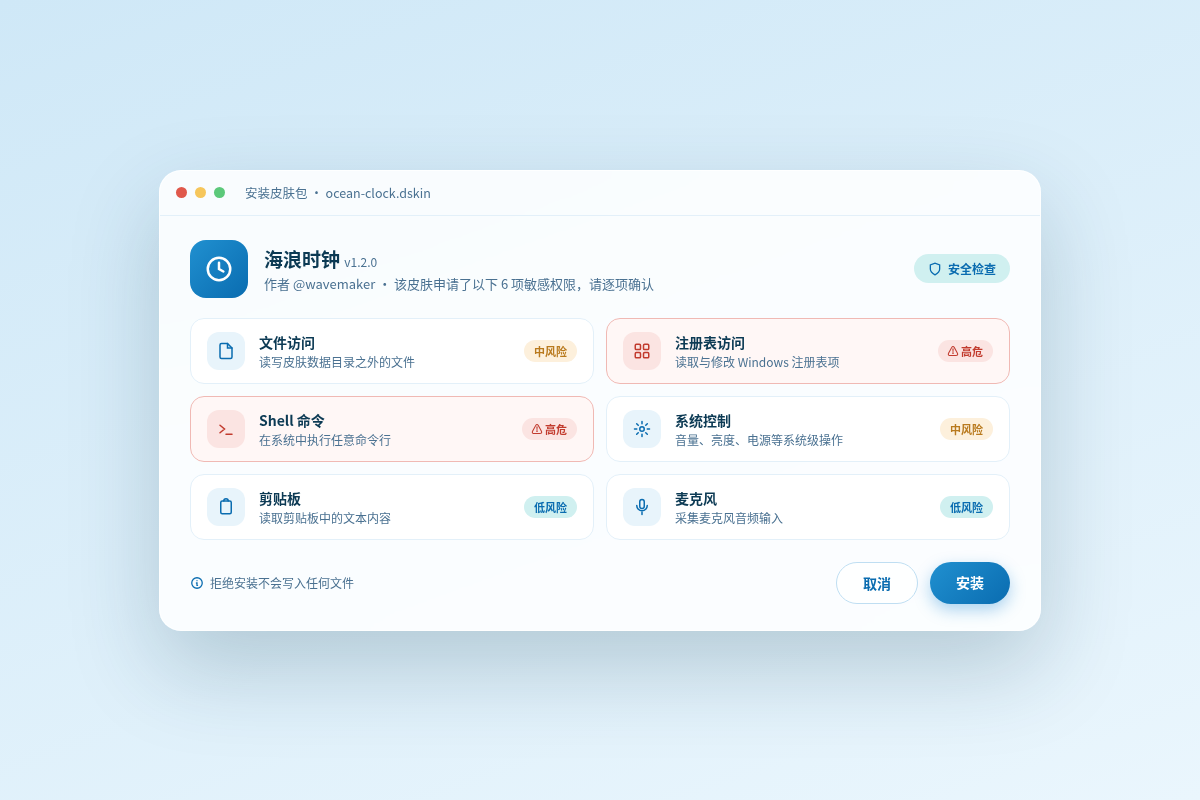
See every step before you decide
Scroll along to walk a .dskin skin from double-click to installed.
Double-click a .dskin
The wizard opens with the skin's name, author and version.
Review permissions item by item
Each sensitive permission is listed separately, high-risk items flagged in red.
Decline, and nothing installs
Cancel and the process aborts — no files touch your disk.
Beyond permissions: three more lines of defense
Even with granted permissions, a skin remains bound by these three layers of protection.
File sandbox
A skin's file access is confined to its own sandbox directory — your personal files stay untouched.
Archive attack protection
Zip-Slip path traversal and zip bombs are detected and blocked at install time, before a malicious package can do anything.
Settings isolation
Every skin's settings are stored separately and invisible to other skins — swapping or removing skins never interferes.
Convenience should never cost your desktop its safety.
— Driftlet design principle
Put webpages on your desktop with confidence
Open source, transparent permissions — safety you can verify yourself.